
How AI Appointment Booking Works for Service Businesses
September 11, 2026
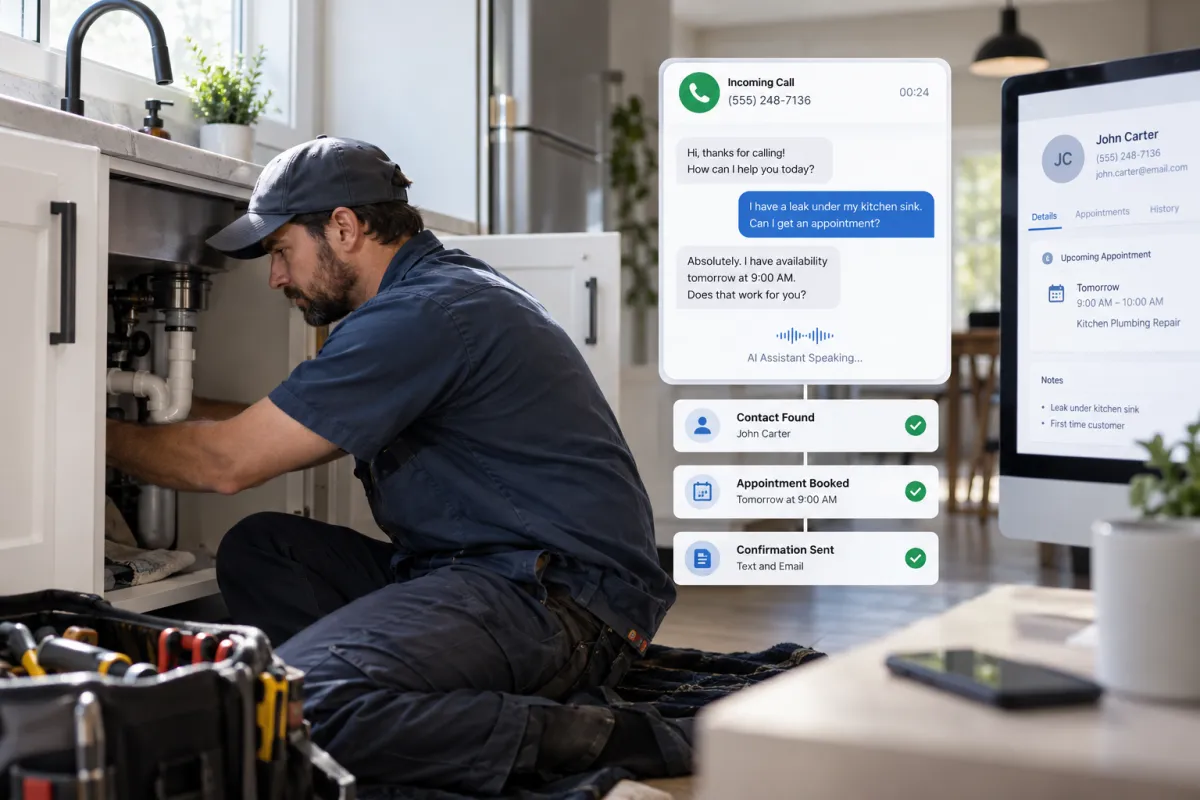
Every unanswered call or delayed reply can become a lost appointment. For service businesses, however, answering every inquiry is difficult when employees are helping customers, working in the field, or handling jobs after hours.
AI appointment booking for small business solves this problem by giving prospects a fast, conversational way to schedule services without waiting for a staff member. Instead of simply displaying an online calendar, an AI booking system can answer questions, collect customer information, apply scheduling rules, and trigger follow-up workflows.
Here is how the technology works, where it fits, and what service businesses should consider before implementing it.
What Is AI Appointment Booking for Small Business?
AI appointment booking uses conversational artificial intelligence and workflow automation to schedule appointments through phone calls, website chat, text messages, or other communication channels.
A traditional booking form requires the customer to navigate a set of fields and choose an available time. An AI scheduling assistant creates a more natural interaction. A prospect can say, “My air conditioner stopped cooling, and I need someone tomorrow afternoon,” or type, “Do you have a dental cleaning available next week?” The system identifies the request, gathers the required details, and offers appropriate times.
When voice calls are a major source of leads, an AI receptionist and voice agent can also answer common questions, route urgent calls, and schedule appointments when the office is closed or the team is busy.
The goal is not to remove people from every interaction. It is to automate repetitive scheduling tasks while giving employees a clear path to take over when a request requires judgment, empathy, or specialized knowledge.
How Automated Appointment Booking Works
A well-designed booking workflow usually connects the customer-facing conversation to a calendar, CRM, and follow-up system. Although the exact setup varies by business, most workflows follow six stages.
1. The AI Receives an Inquiry
The interaction may begin with an incoming phone call, website chat, form submission, or text message. The AI introduces the business, asks what the customer needs, and determines whether the inquiry is related to scheduling.
For example, a plumbing caller might report a leaking water heater. A roofing prospect may request an inspection after a storm. A law firm lead might ask for an initial consultation. Each conversation requires different questions and booking rules.
2. It Identifies the Customer’s Intent
The system uses natural language processing to understand the request rather than relying entirely on rigid menu options. It may distinguish between a new booking, rescheduling request, cancellation, emergency, billing question, or general service inquiry.
This classification matters because not every request should reach the calendar. An electrical hazard may need immediate escalation, while a request for a routine HVAC tune-up can move directly into scheduling.
3. It Collects and Qualifies Information
The AI booking agent asks for the details needed to create a useful appointment record. Depending on the business, this may include:
- Name, phone number, and email address
- Service address or ZIP code
- Requested service or primary concern
- New or existing customer status
- Preferred day or time window
- Insurance, case type, property type, or equipment details
- Consent to receive appointment-related messages
Qualification should remain focused. Asking too many questions can frustrate a ready-to-book customer. The best workflow collects only what the business needs to determine the next step and prepare its team.
4. It Checks Real-Time Availability
Once the required information is collected, the assistant checks the connected calendar. It can account for working hours, appointment duration, technician availability, service area, buffer time, holidays, and other operational rules.
A dental practice could reserve specific blocks for new-patient exams. An HVAC company could offer arrival windows based on the customer’s service zone. A law firm might route consultations to calendars based on practice area. These rules prevent the system from offering times the business cannot fulfill.
5. It Books and Confirms the Appointment
After the customer selects a time, the system creates the appointment and confirms the details verbally or in writing. It can then send a confirmation by text or email with information such as the scheduled time, service address, preparation instructions, cancellation policy, or rescheduling method.
The customer record and conversation details can also be added to the CRM. This gives the office or field team context without requiring someone to re-enter information manually.
6. It Triggers Follow-Up Automation
Booking is only one part of the workflow. Appointment automation for service businesses can trigger reminders, internal notifications, intake forms, estimate follow-ups, and post-appointment review requests.
For businesses that want scheduling connected to lead nurturing and customer communication, a done-for-you AI marketing automation system can coordinate the AI conversation, CRM pipeline, calendar, and follow-up sequences.
Practical Examples by Service Business
Home Services
An HVAC, plumbing, electrical, or roofing company can use an AI scheduling assistant to capture calls while technicians are on job sites. The system can collect the address, identify the service category, determine whether the issue appears urgent, and offer an available service window.
Safety-related language should trigger special handling. Reports of a gas smell, sparks, flooding, or another potential emergency should follow an approved escalation script rather than being treated as an ordinary booking.
Medspas and Dental Practices
A practice can let prospects request consultations, routine appointments, or approved treatments based on provider availability. The assistant can explain basic scheduling requirements and send intake instructions, but it should not diagnose conditions or make unsupported clinical claims.
Healthcare-related businesses should also confirm that every connected vendor and workflow meets their privacy, security, consent, and record-handling obligations.
Law Firms
A law firm can collect a lead’s contact information, broad matter type, location, and preferred consultation time. The workflow should avoid implying that an attorney-client relationship has been created. Sensitive or complex questions should be transferred to trained staff.
Marketing Agencies and Other Small Businesses
Agencies, consultants, and local service providers can qualify prospects before placing them on a discovery-call calendar. The system might ask about the requested service, current challenge, business type, and timeline, then assign the appointment to the right team member.
Benefits of an AI Booking Agent
The strongest business case is usually operational rather than futuristic. Automated appointment booking can help a service company:
- Respond to inquiries outside normal business hours
- Capture callers when employees cannot answer
- Reduce repetitive scheduling and data-entry work
- Give customers immediate access to available times
- Apply consistent qualification and routing rules
- Keep appointment details synchronized with the CRM
- Send reminders and follow-ups without manual effort
Results depend on call volume, lead quality, workflow design, calendar accuracy, and staff adoption. AI cannot fix an unclear service process or an unmanaged calendar. It performs best when the underlying business rules are documented first.
Common Mistakes to Avoid
Automating Without a Human Handoff
Customers may have unusual requests, accessibility needs, complaints, or emergencies. Provide clear escalation options and define when the AI should transfer the conversation, create a priority task, or request a callback.
Connecting an Inaccurate Calendar
If staff availability, service areas, or appointment durations are wrong, the AI will confidently offer unsuitable times. Calendar ownership and update procedures should be established before launch.
Using Generic Scripts
A roofing inspection, dental appointment, legal consultation, and plumbing dispatch are not interchangeable. Questions, terminology, disclaimers, urgency rules, and confirmation messages should reflect the actual service.
Ignoring Consent and Data Handling
Businesses should review applicable federal and state requirements for calls, recordings, text messages, marketing consent, and personal information. The National Institute of Standards and Technology’s AI Risk Management Framework is also a useful external resource when creating policies for trustworthy AI use.
Trying to Automate Every Conversation
A good system recognizes its limits. Billing disputes, clinical questions, complex estimates, legal advice, and emotionally sensitive situations generally require human review.
How to Implement Appointment Automation for Service Businesses
- Map the current booking process. Document where inquiries come from, what employees ask, how appointments are assigned, and where delays occur.
- Choose the initial channels. Start with the channel creating the biggest problem, such as missed phone calls or slow website-lead response.
- Define scheduling rules. Specify services, durations, availability, service areas, buffers, team assignments, and blackout dates.
- Write qualification and escalation logic. Decide which questions are essential and which responses require a human.
- Connect the technology. Integrate the AI assistant with the calendar, CRM, phone system, forms, and messaging tools.
- Test realistic scenarios. Include routine requests, interruptions, unclear answers, cancellations, emergencies, and requests outside the service area.
- Launch with oversight. Review transcripts, appointment accuracy, handoffs, and customer feedback. Refine the workflow as real conversations reveal gaps.
Before measuring return on investment, establish a baseline for missed inquiries, response time, booking completion, no-shows, administrative workload, and appointments requiring correction. This makes it easier to evaluate whether the system is improving operations without relying on vanity metrics.
Frequently Asked Questions
Can AI book appointments over the phone?
Yes. A voice-based AI agent can answer an incoming call, ask questions, check connected calendar availability, create the appointment, and send a confirmation. The workflow should include transfer and callback options.
Can customers reschedule or cancel?
Yes, if those actions are included in the automation rules. The system can verify the customer, locate the appointment, apply the business’s policies, and offer another available time.
Does AI appointment booking replace front-desk staff?
Not necessarily. It is often most useful as overflow, after-hours, and repetitive-task support. Staff can spend more time on customers and situations that require human attention.
What systems need to be connected?
At minimum, the booking agent needs access to an accurate calendar. Many businesses also connect a CRM, business phone number, website chat, forms, text messaging, and email automation.
How long does implementation take?
The timeline depends on the number of services, calendars, locations, integrations, and compliance requirements. A simple workflow is easier to configure than a multi-location dispatch or provider-routing system. Testing should not be skipped.
Build a Booking System Around Your Actual Business
AI appointment booking should reflect how your company serves customers, not force your team into a generic template. The right setup combines conversational AI with accurate calendars, CRM records, practical routing rules, and reliable human handoffs.
The Digital Success builds connected, done-for-you growth and automation systems for service businesses. Explore our AI business automation and CRM solutions to create a booking workflow designed around your calls, leads, team, and customer journey.
Put the ideas to work.
We can map the right system for your business.